How to play GTA 6 at 60 fps with a PC
GTA 6 runs at 30 fps on PS5, PS5 Pro and Xbox Series X|S, but you can watch it at 60 fps on a Windows PC. Send the console picture to the PC with Remote Play or a capture card, then let frame generation software such as Lossless Scaling ($6.99 on Steam in the US) add a new frame between each pair of real ones. GTA Portable's review of the available reports shows the catch: it looks smoother, but the game still reacts like 30 fps.
- The console stays at 30 fps. There is no 60 fps mode, no announced 60 fps patch and no announced PC version. The PC only adds generated frames to the picture it receives.
- Cheapest route to try: the free PS Remote Play or Xbox app plus Lossless Scaling ($6.99) with frame generation set to X2.
- Cleanest picture in theory: an HDMI capture card, but we found no confirmed result with Lossless Scaling yet. On PS5 you must switch off HDCP first.
- Free all-in-one apps: SmoovPlay and Veyra are open source and do the streaming and frame generation in one window. Veyra's NVIDIA frame generation needs an RTX 40 or 50 card.
- Input lag does not improve and can get worse. SmoovPlay's developer reports about 20 ms extra at 60 fps on top of Remote Play, from a recorded clip rather than live play.
On this page
- Can you really play GTA 6 at 60 fps?
- What do you need?
- Which way should you use: Remote Play or a capture card?
- Setup 1: PS Remote Play or the Xbox app
- Setup 2: a capture card
- How to set up Lossless Scaling for GTA 6 at 60 fps
- What about Veyra, SmoovPlay and the DLSS 5 videos?
- Does it add input lag, and how bad is it?
- Can you get banned?
Can you really play GTA 6 at 60 fps?
Only as a picture, not as a game mode. GTA 6 runs at 30 fps on PS5, PS5 Pro and Xbox Series X|S. Rockstar told Kotaku there is no 60 fps or 40 fps mode on any launch console, and no 60 fps patch or PC version has been announced. Digital Foundry found the base PS5 drops below 30 more often than the Pro, and the Series S has the loosest lock, with long stretches in the mid to upper 20s. Our 60 fps explainer covers why.
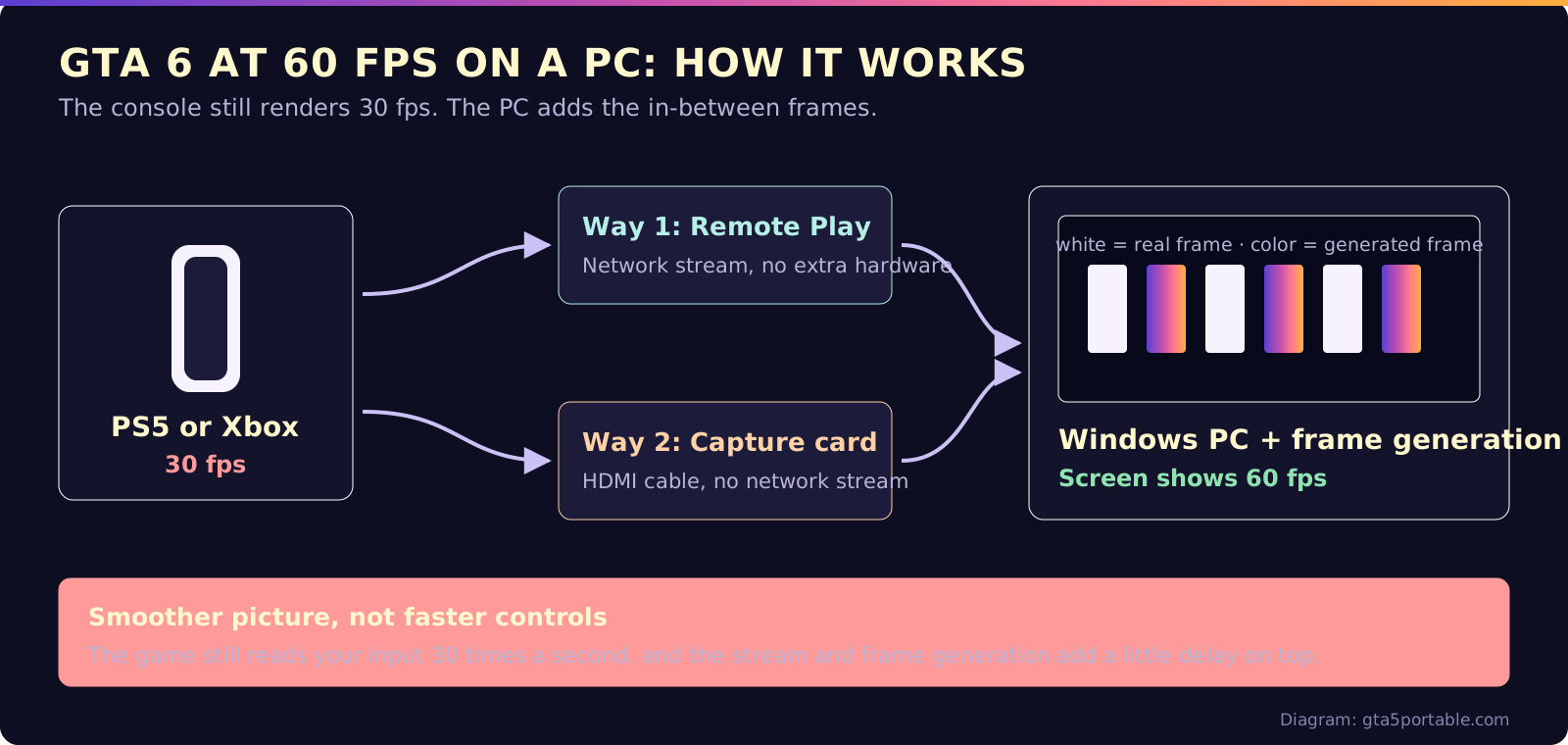
The workaround moves the work to a Windows PC. The console sends its 30 fps picture to the PC, and frame generation software draws an extra frame between each pair of real ones. Your monitor then shows 60 fps.
What do you need?
- Your console: PS5, PS5 Pro, Xbox Series X or Xbox Series S with GTA 6.
- A Windows PC, ideally with a dedicated graphics card. Lossless Scaling runs even on integrated graphics, but the store page recommends an RTX 30, RX 6000 or Arc card or newer.
- One way to get the picture to the PC: Remote Play over your network, or an HDMI capture card.
- Frame generation software: Lossless Scaling, or a free all-in-one app such as SmoovPlay or Veyra.
- A wired network connection and a USB cable for the controller. Android.com.pl recommends Ethernet, and its tester plugged the DualSense into the PC. Both give the stream a better chance of staying smooth.
Which way should you use: Remote Play or a capture card?
Start with Remote Play. It needs no extra hardware, so it is the cheapest way to find out whether you like the result.
| Remote Play + Lossless Scaling | Capture card + Lossless Scaling | SmoovPlay or Veyra | |
|---|---|---|---|
| Extra cost | $6.99 for Lossless Scaling | Capture card plus $6.99 | Free, open source |
| Picture going in | Compressed stream, 1080p in the Xbox app and chiaki-ng settings | Uncompressed HDMI picture | Stream or capture card |
| Delay on the 60 fps screen | Stream delay plus frame generation | No network stream, but capture and frame generation still add delay | SmoovPlay reports about 20 ms extra at 60 fps on top of Remote Play |
| Setup | Easy | Medium, HDCP must be off on PS5 | Medium, pairing code and Windows setup |
| Works with | PS5 and Xbox (official apps) | PS5 and Xbox (HDMI) | SmoovPlay: PS5 tested, Xbox and capture cards experimental. Veyra: capture card or PS5 Remote Play |
We found no published delay comparison for GTA 6 between these setups as of November 20, 2026.
Setup 1: PS Remote Play or the Xbox app
Rockstar has not specifically confirmed PC Remote Play for GTA 6, Dexerto notes, but it runs through Sony's and Microsoft's own apps. The full steps, including phones and the PS Portal, are in our Remote Play guide.
PS5: on the console, go to Settings, System, Remote Play and turn on Remote Play. For waking the console from the PC, Sony says to turn on Stay Connected to the Internet and Enable Turning on PS5 from Network in the Rest Mode settings. Install PS Remote Play on Windows 10 or 11, sign in and connect. Sony asks for at least 5 Mbps and recommends at least 15 Mbps. Android.com.pl reported that the official app closed at sign-in on its Windows 11 PC, so its tester switched to chiaki-ng.
The free chiaki-ng app is an open-source alternative. Its documentation lets you choose 720p or 1080p and 30 or 60 fps for the stream.
Set the stream to 30 fps if your app allows it, so Lossless Scaling gets the game's real frames and not repeats: chiaki-ng has a 30 fps option, and Sony says you can set the frame rate in the app's video quality settings.
Xbox: Microsoft's Xbox app for Windows has Remote Play built in. Xbox asks for Windows 10 or 11 version 22H2 or later, a 5 GHz Wi-Fi network and at least 10 Mbps. Xbox Wire described the PC stream as 1080p at up to 60 fps when it launched.
Setup 2: a capture card
A capture card takes the console's HDMI output, so the PC gets an uncompressed picture instead of a network stream.
- Turn off HDCP on PS5: Settings, System, HDMI, then switch off Enable HDCP. Elgato says the picture stays black if you skip this. SmoovPlay's guide adds that you should turn it back on for video apps like Netflix.
- Connect the console to the card's HDMI in. Elgato lists the 4K S for up to 4K at 60 fps.
- Open the capture preview window (OBS or your card's app) on the PC, windowed or borderless, then set up Lossless Scaling below.
- Check the counter before you judge the result. In our understanding, the console's HDMI signal usually refreshes at 60 Hz, so a 30 fps game may reach the PC with every frame shown twice. If Lossless Scaling's counter reads about 60 going in, X2 will not make the picture smoother. We could not confirm how Lossless Scaling handles this, and we have not tested it ourselves. SmoovPlay says it skips repeated frames, but its capture card support is experimental.
Play on the PC screen. A TV on the card's pass-through output shows the console's own 30 fps, without frame generation.
How to set up Lossless Scaling for GTA 6 at 60 fps
Lossless Scaling is a Windows app on Steam. It scales windowed and borderless windows, which is why it can boost a Remote Play or capture window. Get the console picture onto the PC first with Setup 1 or Setup 2.
- Make the stream window windowed or borderless. Exclusive fullscreen is not supported, the Steam page says, unless the output goes to a second display.
- Open Lossless Scaling. Under Frame Generation, pick LSFG 3, set Mode to Fixed and the multiplier to X2.
- Set Flow Scale to 80 to 100% for a 1080p stream. Lower it if your graphics card struggles.
- Turn on Performance only if you have a weaker graphics card. It uses less of the GPU for a slightly rougher picture.
- Turn on Draw FPS so you can see the frame counter.
- Click Scale and select the stream window within 5 seconds.
- Check the counter. With X2, the output figure should be about double the input: about 30 in and about 60 out for GTA 6. If the input figure is also near 60, the stream is probably repeating frames. Go back to the 30 fps stream setting in Setup 1, or see the capture card note in Setup 2.
- Optional: if the picture looks uneven on a monitor faster than 60 Hz, try setting Windows to 60 Hz. Android.com.pl's tester kept the monitor at 60 Hz for the 30 to 60 doubling.
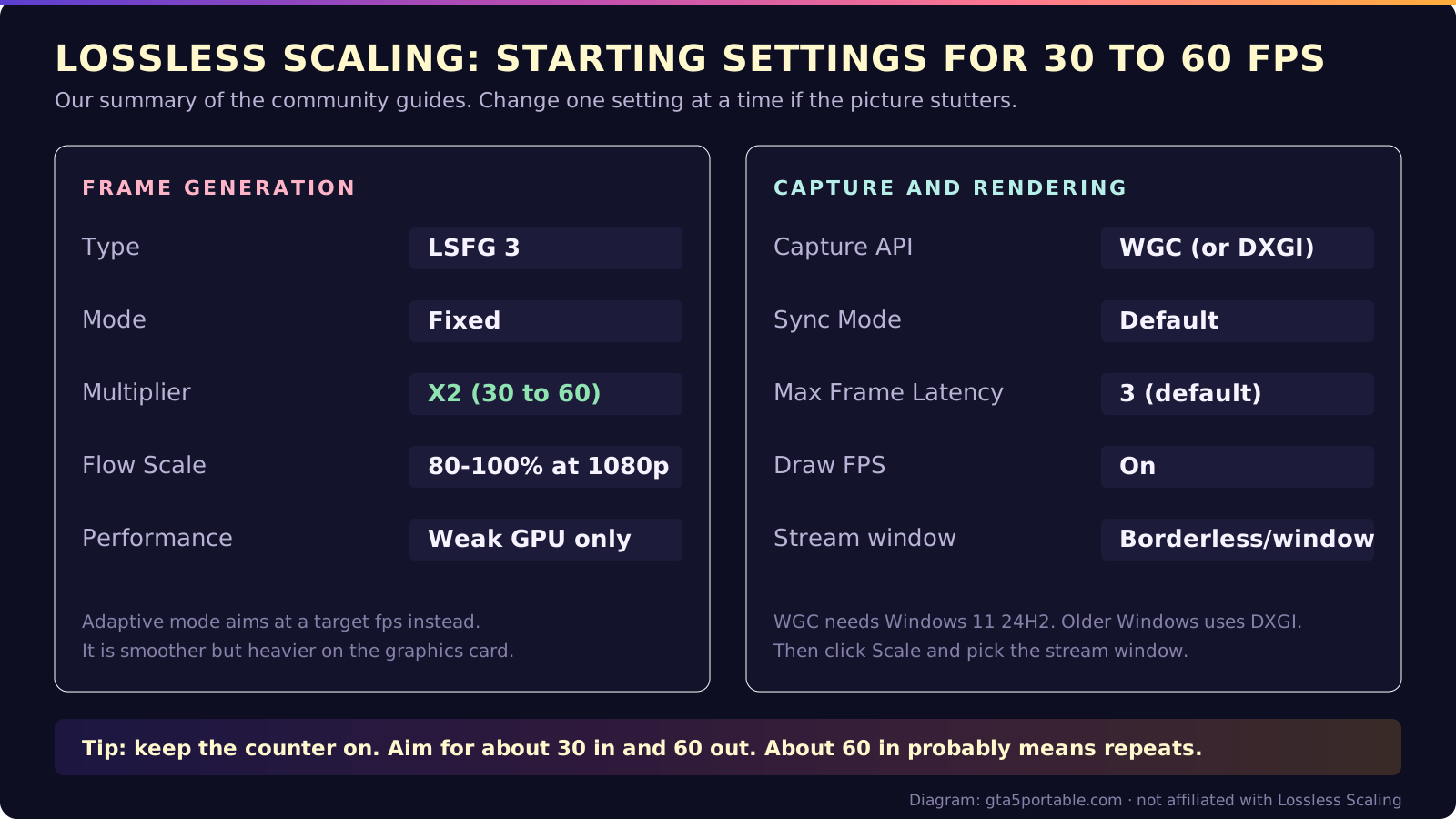
| Setting | Start with | Why |
|---|---|---|
| Frame Generation type | LSFG 3 | The current version |
| Mode | Fixed, X2 | 30 fps in, 60 fps out. Adaptive aims at a target fps but costs more GPU |
| Flow Scale | 80 to 100% at 1080p | Higher looks better and costs more GPU |
| Performance | On only for weaker GPUs | Less GPU load, slightly lower quality |
| Capture API | WGC, or DXGI | WGC needs Windows 11 24H2 |
| Sync Mode | Default | Off has the lowest delay but tears |
| Max Frame Latency | 3 (default) | The guide suggests trying 2 or 10 |
Expect some artifacts. SageInfinity's best settings guide recommends a base of at least 40 fps for frame generation, and a console gives you 30. If the picture stutters, change one setting at a time.
What about Veyra, SmoovPlay and the DLSS 5 videos?
Two free, open-source Windows apps do the streaming and frame generation in one place:
- SmoovPlay builds on chiaki-ng for PS5 Remote Play. Its developer reports about 20 ms extra delay at 60 fps, from a recorded clip, and about 36 ms at 90 fps, on top of Remote Play's own delay. It needs Windows 10 or 11 and lists NVIDIA RTX 30, 40 and 50 cards as supported, with AMD and Intel experimental.
- Veyra takes a capture card or PS5 Remote Play and adds frame generation and upscaling. It needs Windows 11 and DirectX 12, per its GitHub page, and TweakTown says its NVIDIA frame generation needs an RTX 40 or 50 card. TweakTown reported a user who ran Spider-Man 2 from a PS5 through an Elgato HD60 X at 60 fps with Veyra. Its GitHub page also says the author received creator fees from a community-made crypto token, which it calls not an official release. It is not part of the app, and we do not recommend it.
The headline numbers you see online are a different thing. Notebookcheck reported 262 to 286 fps from a PS5 Pro on a PC with an RTX 5090 and a capture card, using DLSS 4.5 frame generation. Notebookcheck credits the extra frames to DLSS 4.5 frame generation; DLSS 5 is neural rendering that changes lighting and faces. XDA described 120 fps with 4x frame generation. All of these multiply the same 30 real frames, and XDA notes the game still has the input lag of 30 fps, with frame generation, Remote Play and a capture card adding more.
Does it add input lag, and how bad is it?
Yes. Frame generation makes motion look smoother, but it cannot make the game react faster.
| Gets better | Stays the same or gets worse | |
|---|---|---|
| Camera pans and driving | Smoother motion | |
| Controls | Still read 30 times a second, plus stream and frame generation delay | |
| Image quality | Generated frames can show artifacts, more so with a low Flow Scale or Performance on |
We found no published input lag measurement for GTA 6 with this setup as of November 20, 2026. SmoovPlay's own guide pitches it for driving, exploring and story missions, not competitive online play. For gunfights, try both and decide.
Can you get banned?
We found no reports of bans for this method in our search on November 20, 2026. In our understanding, the PC only processes the video it receives. The console settings this guide changes are Remote Play and its wake options, and HDCP for capture cards. Two real risks remain:
- Unofficial apps can break. Asobi's developer says Sony's cloud stopped accepting connections from the app for PS5 cloud streaming, which is not local Remote Play, on November 16, 2026. The report includes no Sony statement, and regular Remote Play kept working. Official apps are the safest choice.
- HDCP off blocks video apps on your PS5 until you turn it back on.
GTA Portable will update this guide if Rockstar adds a 60 fps mode or announces a PC release date.
FAQ
Can you play GTA 6 on 60fps?
Why is GTA 6 locked at 30 FPS?
Will GTA 6 be 60 fps on PC?
Is there a way to make PS Remote Play less laggy?
Is Lossless Scaling free?
Can you get banned for using frame generation on GTA 6?
Last verified Nov 20, 2026 · Sources
We check every claim against the sources below and label it Confirmed (official or multiple reliable outlets), Reported (credible coverage, not official) or Rumor. How we verify.
- Engadget: Rockstar settles a major question about GTA 6's fps decision (via Kotaku) (Nov 18, 2026)
- VGC: GTA 6 base PS5 performance analysis (Digital Foundry) (Nov 18, 2026)
- VGC: GTA 6 Xbox Series S performance analysis (Digital Foundry) (Nov 2026)
- Wccftech: Take-Two holds GTA 6 date, Zelnick on PC (May 22, 2026)
- GamesBeat: Grand Theft Auto VI's PC release is slated for Q1 2027 (Oct 13, 2026 (updated Nov 18, 2026))
- Dexerto: GTA 6 confirms Xbox Cloud Gaming support, but PC players face a catch (Nov 2026)
- Steam: Lossless Scaling (accessed Nov 20, 2026)
- Lossless Scaling 3.1 update notes (Steam Community) (Mar 4, 2025)
- SageInfinity: Lossless Scaling getting started (accessed Nov 20, 2026)
- SageInfinity: Lossless Scaling settings info (accessed Nov 20, 2026)
- SageInfinity: Lossless Scaling best settings and tips (accessed Nov 20, 2026)
- Android.com.pl: GTA 6, sprawdziłem sposoby na 60 fps (Polish) (Nov 17, 2026)
- PlayStation: Remote Play on PC and Mac (accessed Nov 20, 2026)
- Xbox: Remote Play (accessed Nov 20, 2026)
- Xbox Wire: Remote Play on the Xbox app for Windows (Sep 14, 2021)
- chiaki-ng documentation (accessed Nov 20, 2026)
- Elgato: PS5 setup for Game Capture 4K Pro (HDCP) (accessed Nov 20, 2026)
- Elgato: Best capture card for GTA 6 (Jul 14, 2026)
- SmoovPlay on GitHub (accessed Nov 20, 2026)
- Veyra on GitHub (accessed Nov 20, 2026)
- TweakTown: Veyra frame generation tested on Spider-Man 2 (Nov 17, 2026)
- Notebookcheck: GTA 6 PS5 Pro at 280 fps on PC with DLSS 5 (Nov 18, 2026)
- XDA: GTA 6 at 60fps with DLSS 5 through PS5 Remote Play (Nov 20, 2026)
- Twisted Voxel: Sony appears to block Asobi PS5 cloud streaming (Nov 18, 2026)
- TweakTown: Free Veyra app uses RTX 40 and 50 GPUs for GTA 6 on PS5 (Nov 16, 2026)
Related guides
 PerformanceDoes GTA 6 run at 60 fps?No. 30 fps on all four consoles, PS5 Pro included. No 40 or 60 fps mode.Read the guide
 Mobile & Remote PlayHow to play GTA 6 with Remote PlayStream from your own PS5 or Xbox to a phone or PS Portal. Rockstar confirms Remote Play.Read the guide
 PC & PlatformsGTA 6 PC release dateNot announced. A report says Q1 2027; Rockstar has not confirmed it.Read the guide
 GuidesGTA 6 cheats: every known code and how to unlock it61 cheats, unlocked after the story. 19 codes known. Phone, L1 + R1 or LB + RB, then the D-pad code.Read the guide